
目录(4 节)

·
Manage Domains in One Sentence: What Cloudflare MCP Can Do
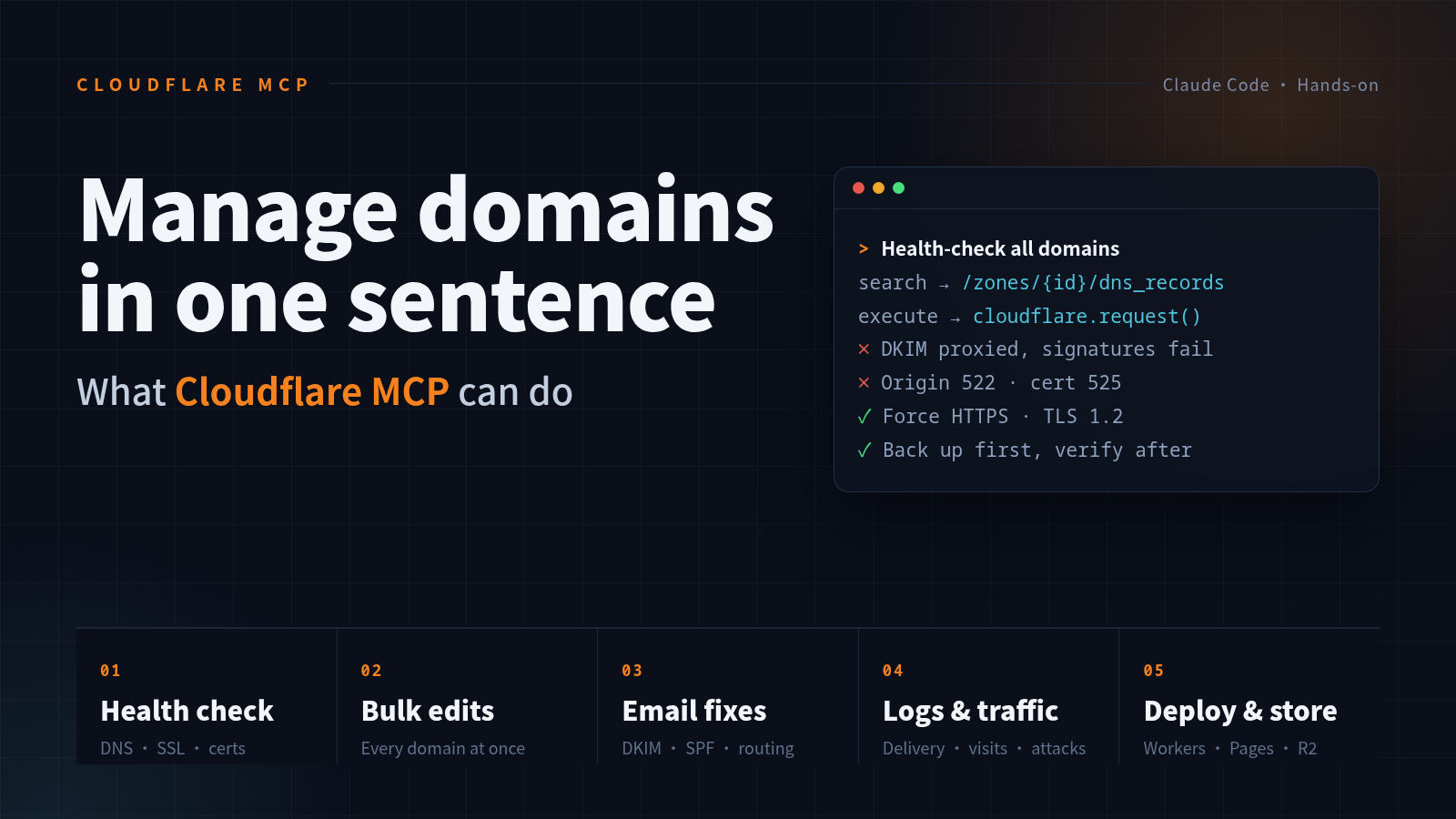
With Cloudflare's official MCP connected to Claude Code, domain health checks, bulk DNS and security changes, email troubleshooting, log queries and Worker deployments each take one sentence. It also has a blind spot: nameserver changes made at your registrar are invisible to Cloudflare.
Once you have more than a handful of domains, the Cloudflare dashboard turns into manual labor. Changing one DNS record takes several clicks through nested menus, and checking certificates or SSL settings means opening each domain one by one. I recently connected Cloudflare’s official MCP server to Claude Code. Most of that work is now one sentence from me and a few API calls from the AI.
This post covers three things: what it is, what it can do, and what to watch out for.
1. What it is: one entry point, the whole API
Cloudflare runs an official remote MCP server at https://mcp.cloudflare.com/mcp. Its design is unusual. Instead of exposing a separate tool for every product, it exposes just four:
-
search: finds endpoints and parameters in Cloudflare’s OpenAPI spec; -
execute: runs a JavaScript snippet that can call any API throughcloudflare.request(); -
docs: looks up the official documentation; -
whoami: confirms which account you’re signed in as.
Given a request, the AI first uses search to find the right endpoint, then writes code for execute. That code can loop, branch, and handle many objects in one go. DNS, SSL, Workers, Pages, R2, WAF, email routing and analytics all go through the same entry point.
Setup takes two steps:
claude mcp add --transport http --scope user cloudflare https://mcp.cloudflare.com/mcp
Then type /mcp in Claude Code and complete the OAuth flow. No API token to create by hand, and you can revoke access from the Cloudflare dashboard at any time.
2. What it can do
Domain health checks
This is what I use most. Say “health check” and the AI walks every domain in the account and pulls:
- every DNS record, and whether each one is proxied;
- SSL mode, forced HTTPS, minimum TLS version, HSTS;
- DNSSEC status;
- certificate type, status and expiry date.
It then runs curl and dig locally against each one, comparing what the configuration says with what the outside world actually sees. Errors like 522 (origin unreachable), 525 (bad origin certificate) and 530 (tunnel down) all show up in one pass.
Bulk changes to DNS and security settings
Settings you would otherwise change one domain at a time can be applied to all of them at once:
- turn on “Always Use HTTPS” everywhere;
- raise the minimum TLS version to 1.2;
- switch SSL from Flexible to Full (have the AI hit the origin directly first to confirm port 443 works);
- delete records pointing at retired servers, after backing up their original values to a local file.
Then have it verify everything again, so each change comes with an actual test result.
Email troubleshooting
Email problems are the hardest to spot, and a dashboard screenshot won’t show them. One classic case turned up in my check: DKIM records with the orange-cloud proxy turned on. Once DKIM is proxied, nobody outside can fetch the public key, every signature check fails, and mail drifts into spam folders. The AI caught it with a single dig and fixed it by switching the records to DNS only.
It can also check SPF syntax (two all terms, say, or an include left over from a provider you dropped), DMARC policy, and Cloudflare Email Routing rules and delivery logs.
Logs and traffic
Through the GraphQL Analytics API you can simply ask:
- what mail this address received recently, whether any was dropped, and why;
- this week’s traffic for a domain, and how many attack requests were blocked;
- the recent deployments of a Pages project, and why any failed.
While going through delivery logs, I also noticed someone sending phishing mail that impersonated a courier company to an address that doesn’t exist. It failed SPF and DMARC, and Cloudflare dropped it.
Deployment and storage
- write a Worker and deploy it directly: a short-link redirect, an API proxy, a scheduled job;
- manage Pages projects and custom domains;
- inspect R2 buckets and usage, and bind a bucket to your own domain as an image CDN;
- configure WAF rules and rate limits, and purge caches.
3. What it can’t see
This part matters most.
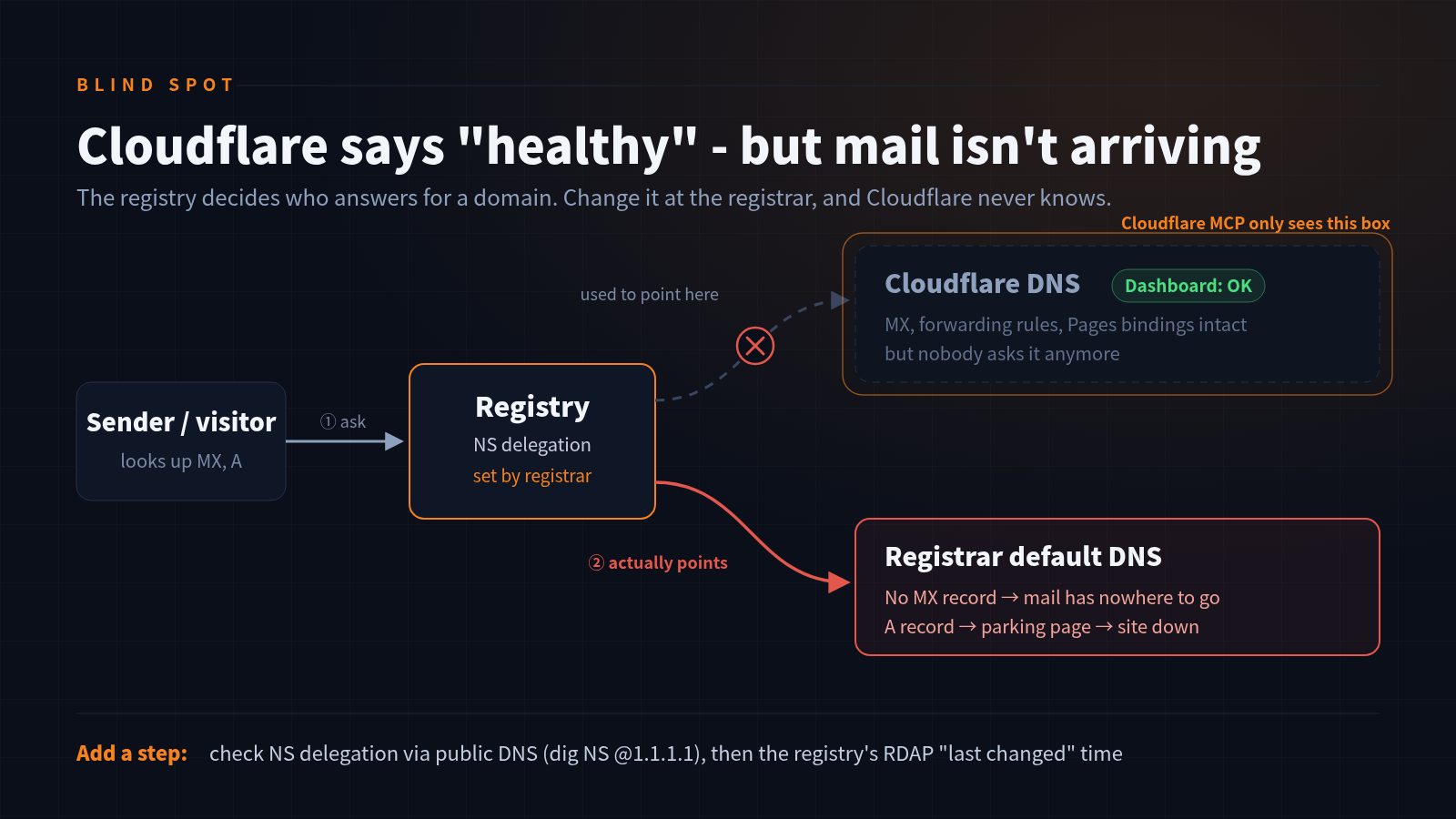
I once asked the AI whether a forwarding address had stopped receiving mail. On the Cloudflare side the forwarding rule was intact, and the logs showed a successful delivery that same morning. But public DNS returned no MX record for the domain.
Going one level up to the registry’s RDAP showed the domain had been changed at the registrar that day: its nameservers had been switched from Cloudflare back to the registrar’s defaults. The Cloudflare dashboard still showed the domain as healthy.
Cloudflare MCP only sees Cloudflare’s own data. It has no idea where the registrar is pointing the domain. A complete health check needs one more step: check NS delegation through public DNS, or connect the registrar’s MCP too and compare both sides.
4. What to watch out for
- Read the config through the API, verify results from outside. The MCP returns what Cloudflare believes. curl, dig and RDAP show what users actually hit.
- Back up before changing, verify right after. Especially when deleting records: keep the original values locally so you can restore them immediately.
-
Layer your permissions. Claude Code’s auto mode blocks DNS and certificate changes by default: reads are free, writes need a human to confirm. Once you’re comfortable, you can allow
mcp__cloudflare__executeunder/permissions, but know that the AI will then change DNS without asking. - Your registrar and your DNS host are two separate systems. A change on one side is invisible to the other, so cross-check them regularly.
- The free plan has switches worth flipping. Forced HTTPS and TLS 1.2 cost nothing; they’re just off by default.
This used to mean a long session of clicking around the dashboard. Now it’s one sentence, results in minutes, and one batch of changes after I confirm. For anyone with a lot of domains, that’s the most practical thing MCP does.
转发此帖子?
与您的关注者分享。
回复