
目录(7 节)

·
HEY CLI: Let AI Clean Your Inbox

1,000+ emails, zero commands typed. I just talked to Claude Code in plain language, and it drove HEY's official CLI: 86 promos trashed, 20 marketing senders screened out for good, 2 phishing emails caught, in about an hour.
My HEY inbox had piled up more than a thousand emails. Yesterday I spent about an hour letting Claude Code clean it up through HEY’s official command-line tool. The result:
- 86 promo emails in the Paper Trail moved to Trash, plus 16 stale domain-renewal reminders;
- 20 marketing-only senders screened out for good, so their mail never arrives again;
- two phishing emails, one posing as the Canada Revenue Agency and one as DocuSign, caught and marked as spam;
- the Imbox “New For You” pile cut from 46 to the 9 that actually needed me;
- 8 long SemiAnalysis newsletters summarized into a single note in Obsidian.
The surprise: while reading my Hetzner emails, it noticed that the PostgreSQL databases on my servers had been open to the public internet. Germany’s federal cyber-security office had been sending a report every month, and I had never read one. Following that thread, we fixed all four servers.
All of this runs on hey-cli, open-sourced by Basecamp.
First, to be clear: I didn’t type these commands
You’ll see plenty of commands below, but I typed exactly one of them myself: hey auth login, because logging in means clicking “authorize” in a browser. Everything else was me saying one sentence to Claude Code, in plain Chinese. It decided which commands to run, ran them, and came back with the results organized for me.
Here is what I actually said (translated) and what it did behind the scenes:
| What I said | What the AI did |
|---|---|
| Get the HEY CLI working | Found the official project, downloaded and verified the latest release, installed the agent skill |
| List the unimportant emails in Paper Trail, I want to bulk-delete them | Pulled all 189 with hey box view --all, grouped them by sender into three buckets for me to review |
| 1 | Took option 1: hey trash on 86 emails, then re-fetched the list to verify |
| Can this be automatic? | Read hey screener history, checked which senders also send bills, proposed 20 to screen out |
| Yes | Ran hey screener deny on those 20 and verified their status |
| Summarize the 8 | Read the 8 senders waiting in the Screener with hey thread read, spotted the 2 phishing emails |
| Only handle these: New For You | Worked out what was expired or already paid, archived it with hey seen and hey move, left 9 |
| Sort out Set Aside | Trashed the promos, moved receipts to Paper Trail, kept the reading list |
| Summarize SemiAnalysis, in more detail, and save it to Obsidian | Read 8 long articles, wrote a structured note, saved it to my vault |
| Note this down, I’ll publish an update in the next couple of days |
hey todo add with a date two days out |
My job came down to three things: state what I want, review the list, say yes or no. The command line is an interface for the AI, not for me.
What hey-cli is
hey-cli is HEY’s official command-line tool (basecamp/hey-cli on GitHub, MIT license). It is both a CLI and a terminal UI (hey tui), and it covers most of what the web app does:
- browse boxes, read, search, reply, compose, forward
- manage the Screener (screen senders in or out)
- move, archive, trash, mark as seen
- labels, collections, drafts, attachments
- calendars, to-dos, journal
But its real design goal is stated right in the docs: it is primarily meant for AI agents and scripts.
Why it works so well with AI
Three design choices stood out.
1. Structured JSON by default. Every command returns ok, data, summary, and a breadcrumbs field that suggests the usual next step. When you’re logged out, for example, it points straight to hey auth login. The AI never has to guess at the output format.
2. Built-in jq. No separate jq install needed:
hey box view imbox --limit 10 \
  --jq '.data.postings[] | "\(.active_at[0:10]) \(.name)"'
There’s also --markdown (render a thread as a Markdown document), --ids-only (IDs only, for piping), and --count.
3. Notes written for agents. hey commands prints the full command catalog, and many commands carry agent_notes that spell out the edge cases. For example:
-
trashtakes a box item ID, not a topic ID; - a
bundlerow isn’t an email, and trashing one “answers success and changes nothing”; -
todo addwithout--datemeans “today” in your HEY account’s time zone.
Those are exactly the details an AI trips over.
Five-minute setup
Install. Homebrew on macOS, yay -S hey-cli on Arch/Omarchy, or the release archives from GitHub elsewhere. I had Claude do it: it downloaded the latest release, verified the SHA-256 checksum, and dropped the binary into ~/.local/bin, with no sudo needed.
Log in. This is the one step you do yourself, because it needs a browser:
hey auth login
It runs OAuth with PKCE, stores the credentials in your system keyring, and refreshes them automatically.
Install the agent skill.
hey skill install
This installs the bundled SKILL.md into ~/.claude/skills/hey, and agents like Claude Code immediately know how to use HEY.
The scenarios, and the commands behind them
The AI chose and ran every command below. I list them so you can see what happens behind the scenes. You don’t need to memorize any of them.
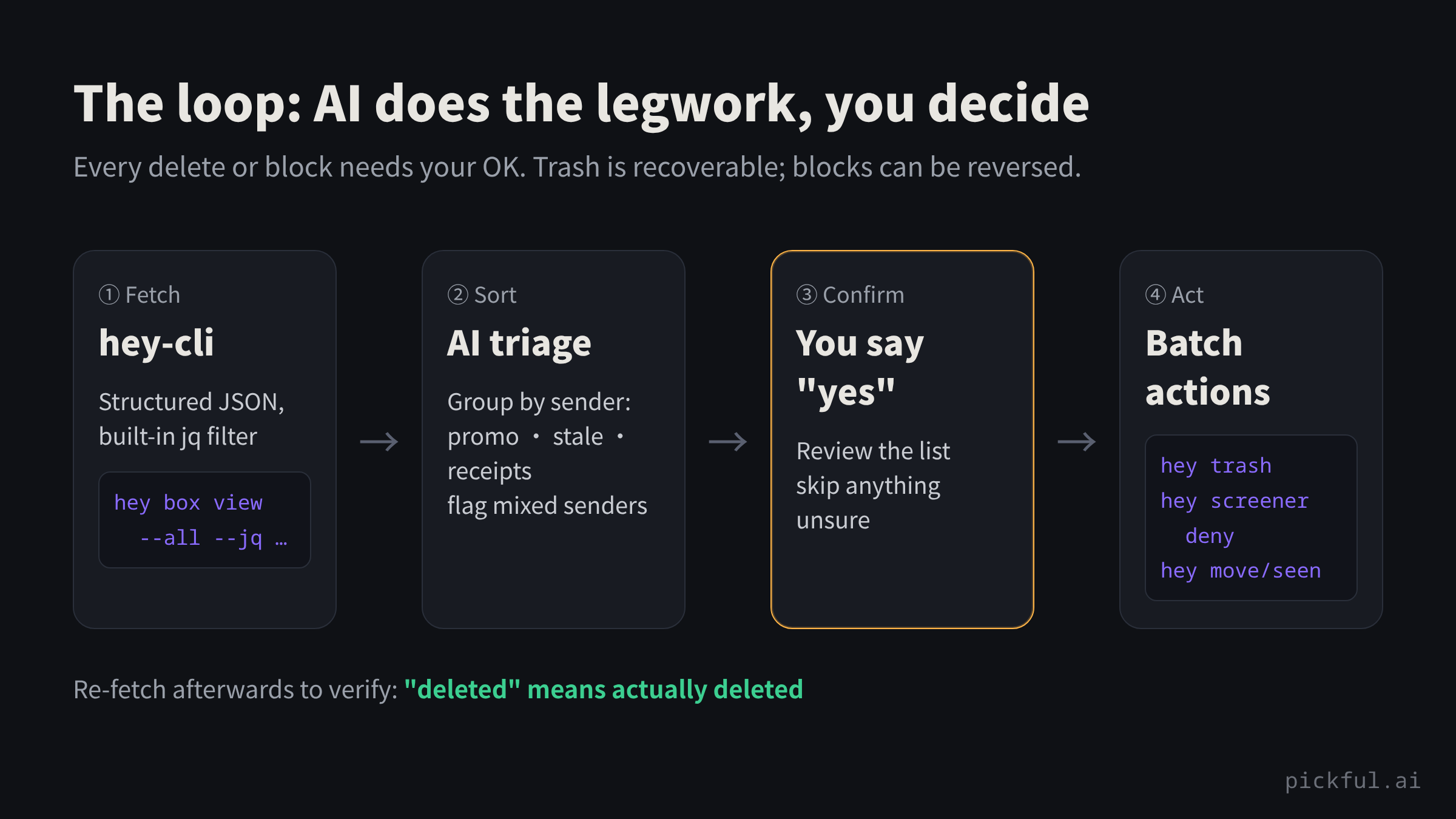
The whole thing is one loop: the AI fetches, sorts and lists; I confirm; it acts and then verifies.
Bulk cleanup by sender
Pull every email in a box and count by sender:
hey box view paper_trail --all \
  --jq '.data.postings[] | .creator.email_address' | sort | uniq -c | sort -rn
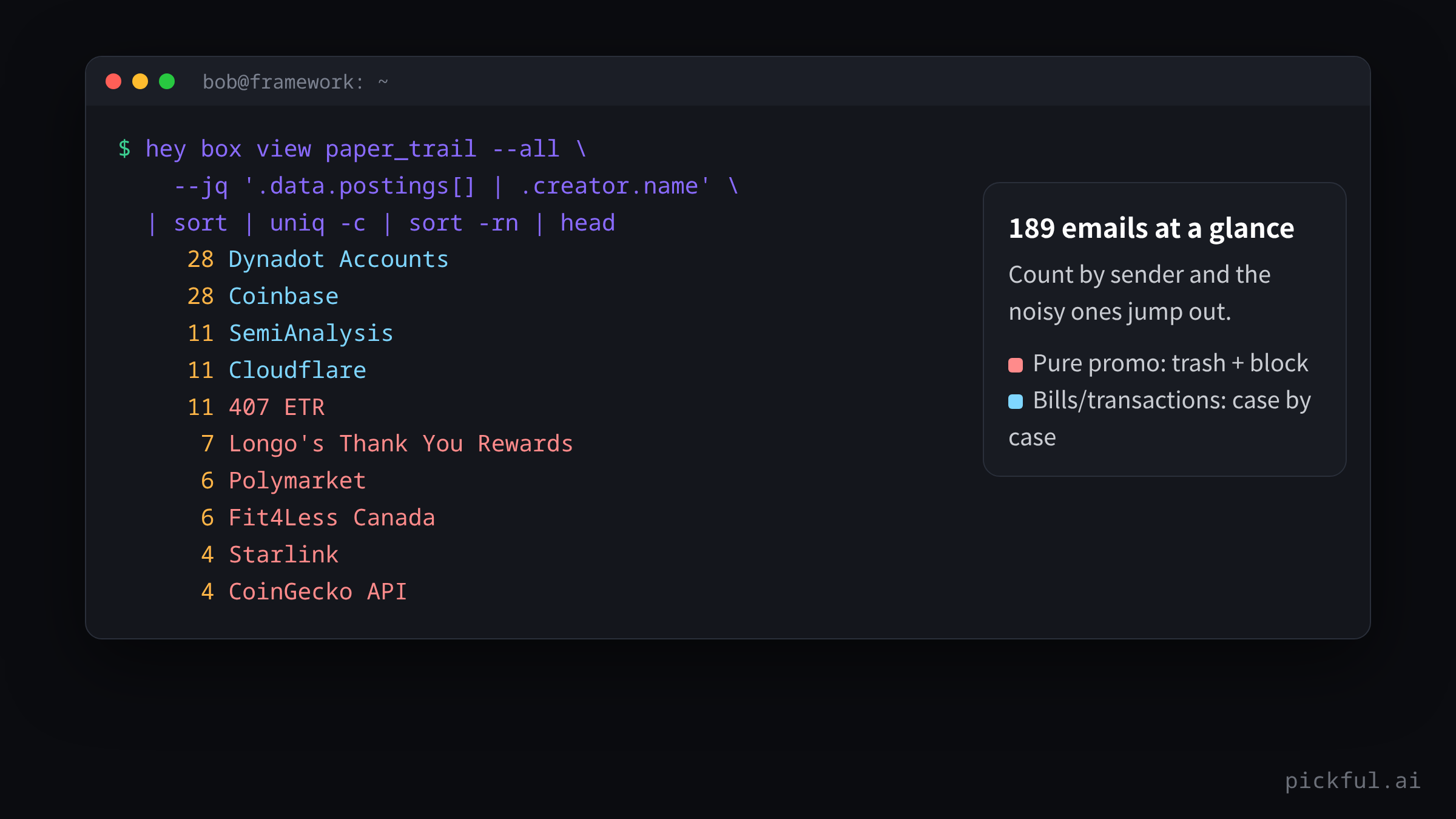
The AI sorted them into promo, stale notices, and receipts. Once I confirmed:
hey trash <id1> <id2> ...
Trashed mail stays recoverable.
Fix it for good: screen senders out
Deleting treats the symptom. The heart of HEY is the Screener: screen a sender out, and their future mail never arrives. hey-cli can list every in-or-out decision you’ve ever made (a “clearance”) and change it:
hey screener history --all          # every past screen-in / screen-out decision
hey screener deny <clearance-id>    # flip it to screened out
hey screener deny <id> --spam       # screen out and mark as spam, training the filter
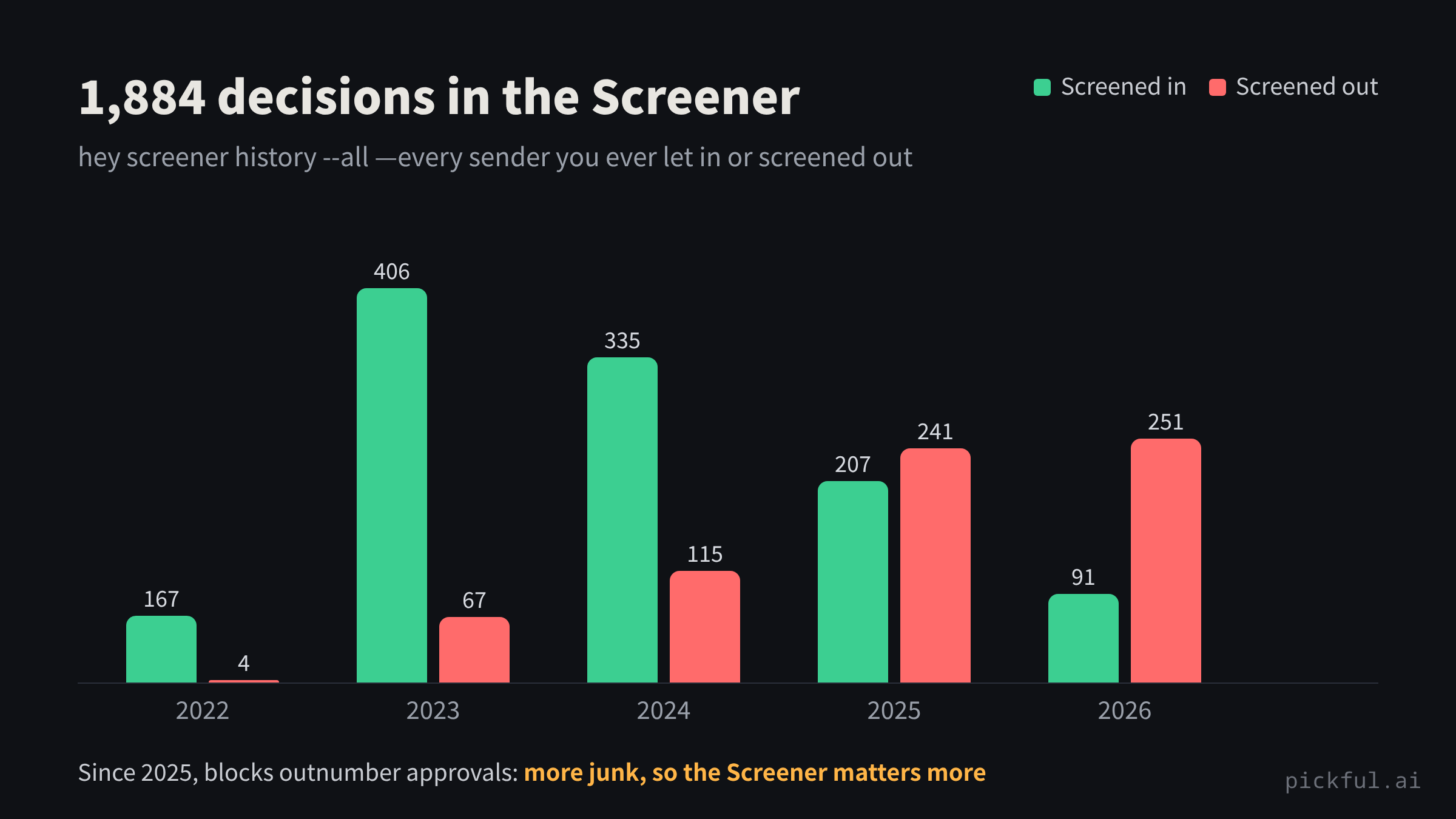
My Screener held 1,884 of these decisions. By year, the trend is obvious:
One subtlety: some addresses send both promos and bills (Cloudflare, Spotify). The AI first checked whether each address had also sent mail I wanted to keep, and skipped any with a conflict. That cross-check is tedious by hand and trivial for an AI.
Clear out “New For You”
hey seen <id>...          # expired events, paid receipts: mark as seen
hey move <id>... --to paper_trail
What remained was what actually mattered: the kids’ payment deadlines, a developer account I need to keep alive, a church serving schedule.
Turn email into knowledge
hey thread read <topic-id> --markdown
Newsletters come out as clean Markdown. The AI summarizes them and writes the result into Obsidian: 8 SemiAnalysis essays became one note with data tables in about ten minutes.
Capture to-dos on the way
hey todo add "Google Play: publish an update before 11-21" --date 2026-11-05
Gotchas
The AI ran into the first two and worked around them by reading the docs. I only found out later, from the logs.
-
Don’t mix up the two IDs. An email has a
topic_id(the thread) and anid(its entry in a particular box).trash,move, andseenwant the latter. -
Entry IDs can change after a move. If you hit
not found, fetch the list again. -
!runs in a non-interactive shell. Inside Claude Code, a!command that needs interactive input will fail. Use another terminal window, or the--token/ environment-variable route. - Deletes and blocks need a human yes. My rule: the AI lists and recommends, and only acts after I say “yes”. Trash is recoverable, and a screened-out sender can always be screened back in.
Takeaway
The future of email clients may not be a prettier interface, but an interface an AI can call safely. hey-cli is the most carefully built one I’ve seen: structured output, agent_notes, and a one-command skill install, all designed for the agent era.
Email piles up every day and never deserves a block of your time. That makes it the perfect job to hand off. You speak plainly and decide; the AI types the commands and does the legwork.
— Wang Xiaoming (Blue Lotus)
转发此帖子?
与您的关注者分享。
回复